As we all know chatbot is getting popular day by day. There are number of tools and platforms that support building chatbot.In this post we will see how we can create simple python webhook to work with bot platforms. For example,
- Facebook Messenger
- Slack
- Telegram
These all platform provides front end for your chatbot. The frontend where user can type and see the messages from chatbot. But behind the scene there is something called webhook that powers your Chatbot. Read my blog about why Chatbots are so popular.
What is a Python Webhook ?
A WebHook is an HTTP callback . An HTTP POST that occurs when something happens. For chatbot webhook is constantly running process which will receive data from bot, process it and send result back.
When you are working with platforms like FB messenger or slack for chatbot, you have to create webhook and add it to platform. This webhook will listen for users message. As soon as it get message, it will process and send reply back to bot.
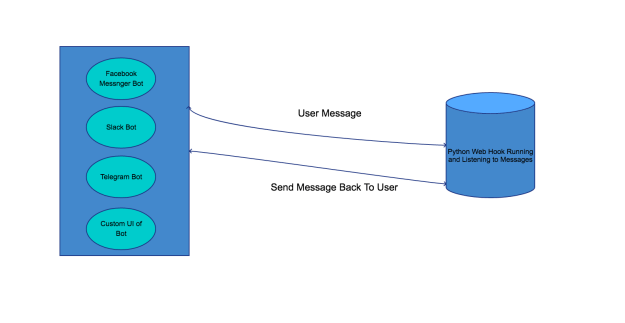
For this post, I assume that you have Python installed in your system.
Install virtual environment
sudo pip install virtualenv
Create folder and activate virtual environment
mkdir DemoPythonWebhook
cd DemoPythonWebhook
source bvenv/bin/activate
Install Python Flask and other packages
pip install flask
sudo pip install requests
pip install json
sudo pip install CORS
Here requests are required for sending HTTP request from webhook, if required. JSON is not encode and decode json data. CORS are required in case you want to handle cross domain requests.
Create Webhook file
Now create new file with name webhook.py and add following code to it.
import requests
import json
from flask import Flask, request
from flask_cors import CORS
app = Flask(__name__)
CORS(app)
@app.route(‘/’, methods=[‘POST’])
def handle_incoming_messages():
data = request.json
message = data[‘message’]
if(message == ‘Hi’):
return json.dumps({
“reply” : “Hi, How are you?”
})
if __name__ == ‘__main__’:
app.run(host=’0.0.0.0′)
As you can see in above code, we have created flask app and configured it for handling cross platform request. We have specified app route.
@app.route(‘/’, methods=[‘POST’])
and here we have defined a method to handle in. In this method we are decoding JSON payload and sending appropriate response back.
To run this web hook, you can type following code in terminal
python webhook.py
That’s it and your webhook is running. You can use Ngrok to publish it or you can host it on AWS lambda. You can check following link on how to use Ngrok
Please note this is just an example code. In case you are working with FB messenger or any other platform, you have to change code according to platform, you are using. Here are some resources in case you want to work on chatbot.
